Application Overview
A comprehensive view of onboarding request essentials organized in one clear interface

Application Summary
The main area displays selected products, company information, onboarding type, and primary servicing locations. All essential details are visible at a glance.
Progress Tracking
A step-by-step sidebar shows completion status for each section. Visual percentages make it easy to see what's complete and what needs attention.
Contact Management
Dedicated sections manage primary contacts and additional stakeholders. Direct access to support teams ensures users always know who to reach for help.
Terms & Documentation
All relevant legal documents are organized by product type, available for review and download to maintain compliance throughout the process.

about CDP
A unified digital platform designed to streamline client onboarding across multiple countries and financial products.
This strategic solution transforms complex multi-country onboarding processes into seamless, compliant experiences that serve both global clients and internal teams.


Transforming multi-country client onboarding
into seamless, compliant experiences across global financial products.

Client relationship journey
The solution centers around three key innovations: streamlined data collection that adapts to local requirements, downstream integration that connects seamlessly with existing systems, and customized experiences tailored to specific product journeys. This approach ensures clients feel guided through their onboarding while maintaining the compliance and data accuracy that financ

Client Digital Portal Strategy
A unified digital platform designed to streamline client onboarding across multiple countries and financial products. This strategic solution transforms complex multi-country onboarding processes into seamless, compliant experiences that serve both global clients and internal teams.
Creating a seamless onboarding experience across multiple countries and products requires thoughtful strategic planning. Through comprehensive product frameworks, I developed a unified digital portal that transforms how global clients interact with complex financial services, making the onboarding process intuitive regardless of location or product complexity.
Delivering Measurable Value
Our digital portal offers a compelling value proposition that benefits multiple stakeholders. For clients, it provides fast, transparent, and personalized onboarding experiences. For financial institutions, it ensures 100% compliance across all jurisdictions while significantly reducing operational overhead. The portal's ability to adapt to different regulatory requirements while maintaining a consistent user experience creates a sustainable competitive advantage in the global market.
An integrated solution
The solution centers around three key innovations: streamlined data collection that adapts to local requirements, downstream integration that connects seamlessly with existing systems, and customized experiences tailored to specific product journeys. This approach ensures clients feel guided through their onboarding while maintaining the compliance and data accuracy that financ

Product features
Know about the product features in detail - update content here

Client Digital Portal Strategy
Through comprehensive product frameworks, I developed a unified digital portal that transforms how global clients interact with complex financial services, making the onboarding process intuitive regardless of location or product complexity.

Understanding Global Onboarding Challenges
Client onboarding in a global context presents unique challenges that go beyond simple form-filling. Time-consuming manual processes, lack of visibility into application status, and fragmented experiences across different products create frustration for both clients and internal teams.
Company Details
A structured form that collects comprehensive company information required for onboarding
Company Information
Captures essential business details including registered company name, registration number, country of incorporation, booking locations, and unique identifiers like SWIFT/BIC codes.
Contact Management
Allows users to designate primary contact persons with their job titles, email addresses, and phone numbers. Additional contacts can be added as needed for complete stakeholder visibility.
Address Collection
Separate sections for registered address and mailing address, with smart functionality to copy details between fields.
Smart Document Validation
Supporting documents are only requested when users modify pre-populated data from upstream systems. Changes trigger validation prompts with clear guidance on which documents are needed to verify the updates.

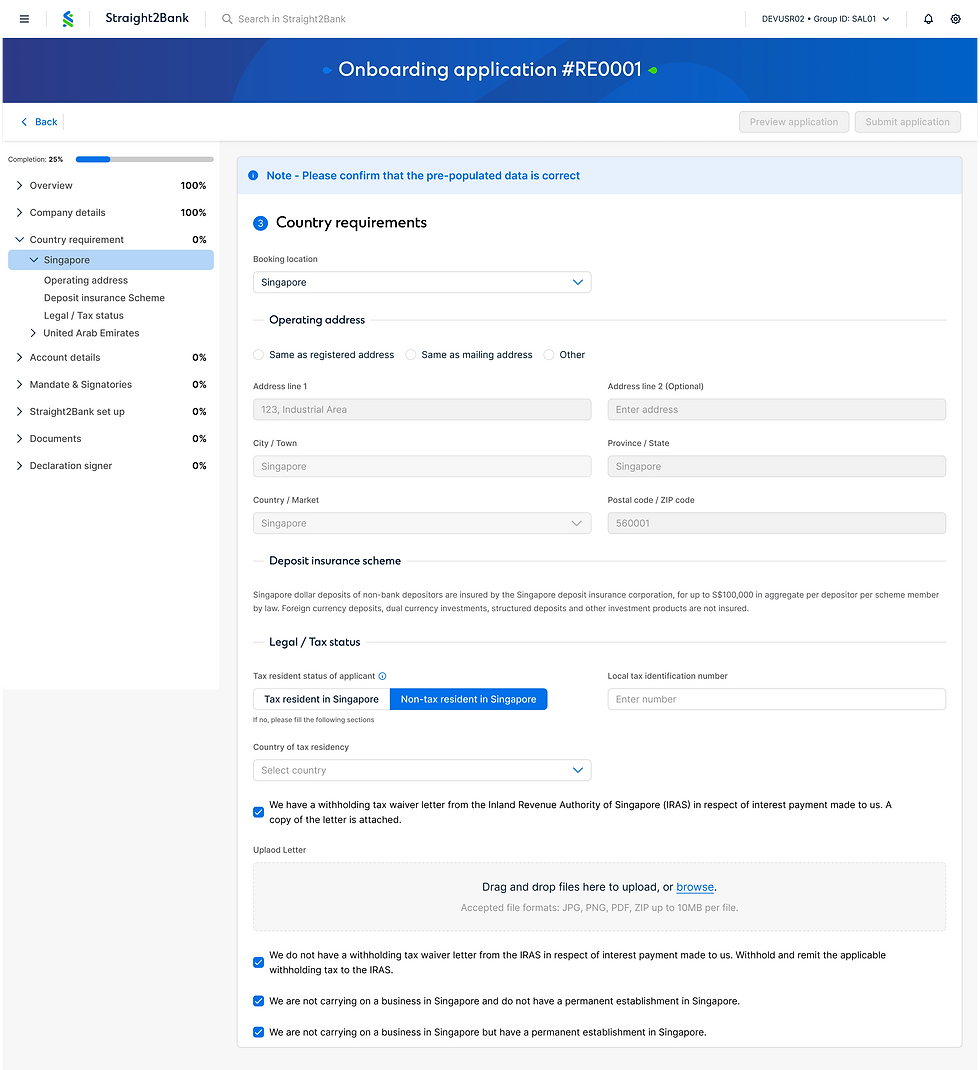
Country Requirements
A dynamic section that collects jurisdiction-specific information based on selected markets
Market Navigation
Users can toggle between their onboarding markets using the dropdown selector at the top or through the left panel navigation, which displays all selected countries for easy switching between jurisdiction-specific requirements.
Operating Address
Smart address collection with options to copy from registered or mailing addresses, or enter a unique location.
Deposit Insurance Information
Displays country-specific deposit insurance schemes with clear explanations of coverage limits, eligible deposit types, and exclusions ensuring clients understand their protection under local regulations.
Tax Status & Compliance
Captures tax residency status with conditional fields that adapt based on selections. Includes document upload for tax waiver letters and declaration options for business establishment status in the jurisdiction.
Account Details
A flexible interface for creating and managing bank accounts across selected
onboarding markets,offering both manual entry and bulk upload options

Market-Based Account Creation
Users toggle between onboarding markets using the country dropdown or left panel navigation to create accounts specific to each jurisdiction. The interface adapts to show market-specific account options and requirements.
Dual Input Methods
Two ways to add accounts: manual entry for individual accounts with detailed configuration, or bulk upload for adding multiple accounts at once using a spreadsheet template.
Comprehensive Account Configuration
Manual entry captures account title, subtitle for identification purposes, account type, currency, chequebook requirements, statement frequency preferences, delivery methods (post, email, or SWIFT), and reserve account number needs.
Account Overview Table
Displays all added accounts in a structured table showing account names, types, and currencies. Each row includes action menus for editing or removing accounts, providing clear visibility of all configured accounts per market.

Mandate setup - with company template
allowing users to set up company mandates and configure authorized signatories across multiple markets.

Flexible Mandate Options
Users can choose between uploading a new company-specific mandate or the system allows reusing previously saved company mandates for returning clients eliminating redundant uploads.
Signatory Management
Add and configure authorized signatories with detailed information. Each signatory can be assigned specific roles mandate signer, authoriser, or all permissions with options to grant platform access for Straight2Bank setup.
Market-Specific Verification
Signatories are verified across their assigned onboarding markets. The interface displays which markets each person is authorized for, with document requirements automatically organized by jurisdiction.
Document Collection by Category
Verification documents are grouped by type with clear indicators showing which markets require each document. Users can upload different document types for different markets, ensuring compliance with local regulatory requirements.

Bank standard mandate
A flexible interface for creating and managing bank accounts across selected
onboarding markets,offering both manual entry and bulk upload options
Market-Based Account Creation
Users toggle between onboarding markets using the country dropdown or left panel navigation to create accounts specific to each jurisdiction. The interface adapts to show market-specific account options and requirements.
Dual Input Methods
Two ways to add accounts: manual entry for individual accounts with detailed configuration, or bulk upload for adding multiple accounts at once using a spreadsheet template.
Comprehensive Account Configuration
Manual entry captures account title, subtitle for identification purposes, account type, currency, chequebook requirements, statement frequency preferences, delivery methods (post, email, or SWIFT), and reserve account number needs.
Account Overview Table
Displays all added accounts in a structured table showing account names, types, and currencies. Each row includes action menus for editing or removing accounts, providing clear visibility of all configured accounts per market.
Client Digital Portal
Designing Integrated Solutions
The solution centers around three key innovations: streamlined data collection that adapts to local requirements, downstream integration that connects seamlessly with existing systems, and customized experiences tailored to specific product journeys. This approach ensures clients feel guided through their onboarding while maintaining the compliance and data accuracy that financ