
Product Goals

Encourage users to use already booked FX
We don’t want our users to have to pay booking fees due to our system’s lack of error prevention or double-book their FX. We want to reduce frustration with the product and the bank.
Make it easier for users to keep track of their FX
We want to ensure that our users are aware of their payments, FX trades and the linkages between these two segments.
Be updated visually
The FX Centre has to get with the times and be created with the new design system in place.
Core User Needs
Initiate
A user in our platform has to be able to create an FX or a payment that needs an FX.
Authorise
For payments to go through, some of our personas need to be able to approve it in a timely manner to avoid fees.
Manage
Power users such as managers must be able to use the FX centre without needing authorisation.
Google analytics: Data payments with FX
12 month analysis - (1 March ’24 – 31 March ’25)
Overview
Current state: Different options provided in the application to link payments and FX
-
Clients book FX > Manage FX > Link FX to payments
-
Clients who book FX > Use prebooked transactions
-
Clients who choose FX as part of payment journey
-
Payment Authorizer actions
Overview
To understand how different options for linking FX & Payments are used by clients in general over a time period of 12 months (March 2024 – March 2025)

Overall usage of FX Menu
Top Groups utilising the FX Request for Quote functionality are high-value Gold and Silver tier clients
The new Unassign FX Rate feature has seen low user activity count over the last 12 months; however, consistent MoM usage

Overall usage of FX Options
Overall, Live FX options have more users and clicks (total events) than Bank Rate
RFQ at Send to Bank and Pre-Booked Rate are the highest used FX options in the last 12 months

MoM Usage of FX options
Request For Quote at Send to Bank has a significantly higher volume of users compared to the other FX options
Nov 2024 has seen highest usage of RFQ at Send to Bank in last 12 months

Research Insights
Double-booking can happen in both flows
Based on flow analysis a double booking can happen both in payment and FX booking flow.
Payment flow
If payment is declined, the associated FX contracts is still on hold. A client may initiate payment with a new FX contract instead of using the existing one.
FX Centre flow
The current product doesn't make the existing FX contracts stand out if the economics of current FX being booked is the same as already existing contracts.
Personas and Tasks
RFQ user
The Request-for-Quote (RFQ) user is responsible for
making sure that FX contracts booked are used.
Book an RFQ
-
Select rate
-
Select the value date
-
Select account
-
Select counterparty/entity
-
Select proof of underlying document
Link FX trade to a payment
-
Select payment to link
-
Select the FX contract to link
Payment initiator
The Payment Initiator is responsible for choosing
the correct FX option on the payment screen.
Create a new payment
-
Select an FX contract for the payment
-
Ask another user to book an FX for the payment
-
Must book an FX transaction (in some cases)
--
--
Payment authoriser
Payments authorises are responsible for
approving transactions.
Authorise payment
-
Review and approve the payment and the FX linked to it
Book an FX
-
Select rate
-
Select the value date
-
Select account
-
Select counterparty/entity
-
Select proof of underlying document


Phase 1
FX Centre
Book, approve, and manage FX contracts
Objective
Users can keep track of their active transactions, and they can request a quote for their upcoming transactions which require currency exchange
Task
HIgher Level Tasks - The Finance Manager wants to book/approve a FX from FX Centre
Lower level task - Monitor, sort and utilise FX contracts
Understanding the FX booking ecosystem
Request for Quote
One of the ways to book an FX. This method involves a 15-second timer to accept a rate. It shows only the value dates for Today, Tomorrow, and Spot (day after tomorrow).
Hedge booking
This method involves executing streaming rates that display the bid and ask prices. It shows a value date picker and tenors.
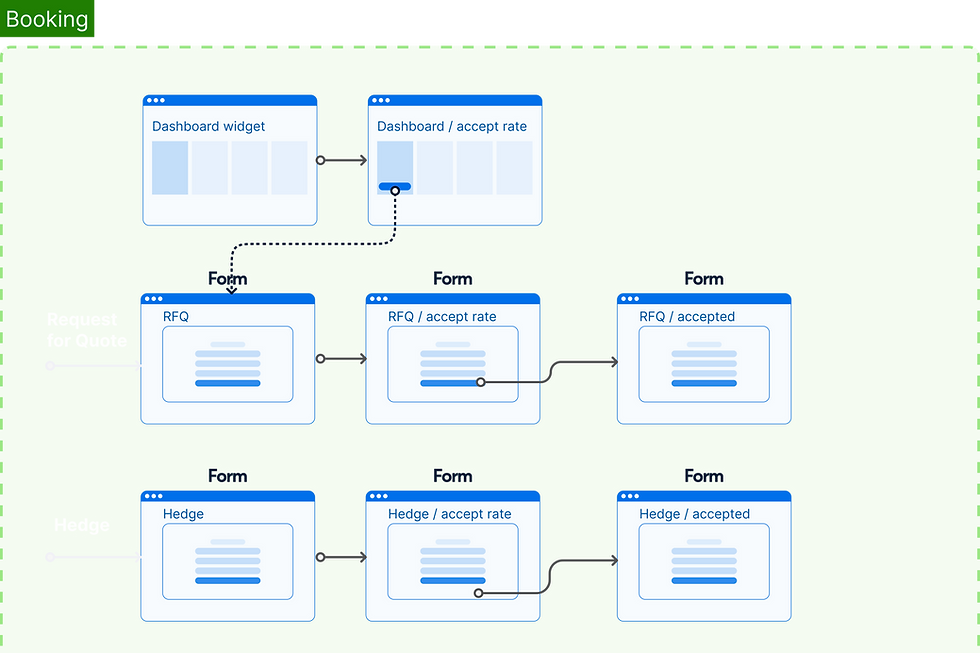

Creating a request for quote: RFQ

Creating a hedge contract

Approving RFQ / Hedges, Rollover & cancellation requests

Creating a rollover request for FX contracts nearing maturity

Creating a cancellation request for FX contracts

PoU (Proof of underlying)
Mandatory for restricted markets to book large scale FX transactions

Phase 2 (W.I.P)
Utilise FX Contracts
Use exsisting or add new contracts for a payment transaction
Objective
Users can continue to use their already booked/active FX contracts for international payments
Task
Higher Level Tasks - Book an FX while making a telegraphic transfer, trade & settlements
Lower-level task - determine spot dates and Deal@best (SCB Bank rates) for FX bookings
Understanding the FX utilisation ecosystem
Utilising FX
You can utilise your approved FX contracts when making a transaction, settling a trade invoice, or receiving an inward telegraphic transfer. A pre-booked FX contract can be utilised instantly without needing any further bank approval
How to get the best deal on your FX
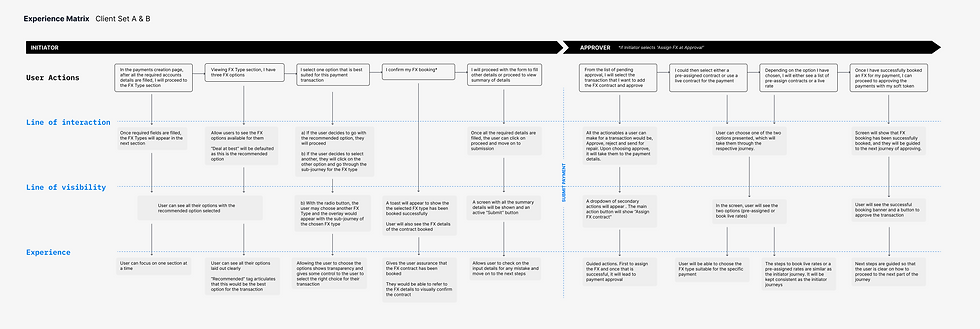
The FX utilisation while making payments provides multiple options to choose from to get the best deal rate 1. user can utilise their existing contract which will give the deal rate similar to their exposure type, 2. they can opt for bank rate 3. they can request for a deal rate assigned to when th e payment it cleared or 4. they can create an instant spot FX booking accepting the current rate for that day

